About PDF Photo
[ Convert Photos to PDF files instantly ] iPDF - Photo to PDF Converter converts photos to PDF files instantly. Now, you can easily share photos with friends and workmates in PDF format. [ How to use ] - Choose photo...
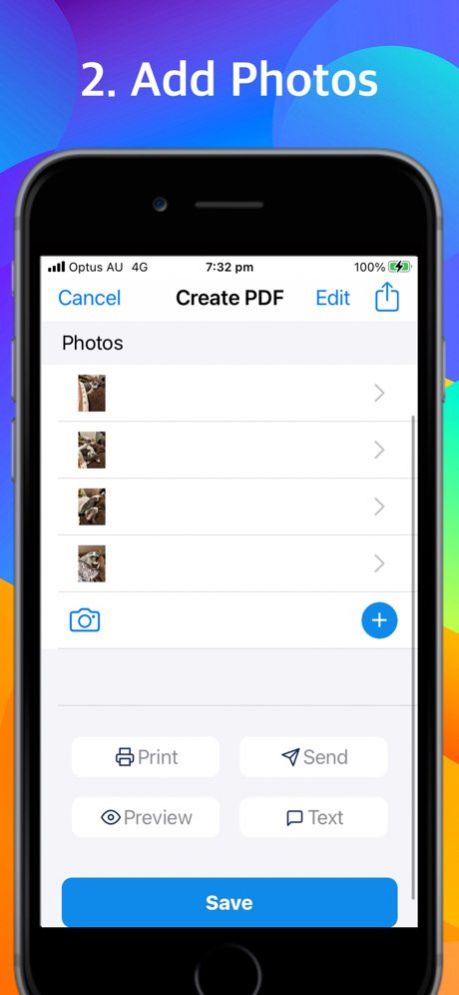
[ Convert Photos to PDF files instantly ] iPDF - Photo to PDF Converter converts photos to PDF files instantly. Now, you can easily share photos with friends and workmates in PDF format. [ How to use ] - Choose photo layout - Add photos - Preview - Share PDF That's it. So simple. [ Share ] You can share PDF files via Email, SMS Text. You can also print, or even save it in iCloud Drive via Files app. Use PDF Photo Converter as a Photo Grid App and save pages as jpg to Photos. You can use photos in Photos app or take photos with your camera and then, convert to pdf. Choose from pre-defined Photo Grid layouts with photo titles and descriptions. Convert jpg to pdf to easily print one or more photos on a page. [ Document Options ] Change orientation and layout instantly and intuitively. Layouts pages lists all the available options. [ Save and Share Anywhere ] Use Apple default "Share" option to share your pdf files to popular PDF readers or storages such as Adobe Reader, Google Drive, Dropbox or OneDrive. You can also convert photos to pdf and automatically save directly to iCloud Drive. Simple and intuitive interface makes PDF Photo the easiest JPG to PDF Converter and Photo Grid App you’ll ever use! [ Upgrade to subscription version ] Subscription version offers cloud sync and back up feature so that you can save all the info in our highly secured cloud services and share the same data in multiple iOS devices such as iPhone and iPad. Upgrading to subscription version requires auto-renewal subscription. Payment will be charged to your Apple ID account at the confirmation of purchase. The subscription automatically renews unless it is canceled at least 24 hours before the end of the current period. Your account will be charged for renewal within 24 hours prior to the end of the current period. You can manage and cancel your subscriptions by going to your App Store account settings after purchase. Links to Your Privacy Policy and Terms of Use: http://www.btoj.com.au/privacy.html http://www.btoj.com.au/terms.html Please feel free to contact us for anything.
Version History Bugs fixed 7.8 02/25/2023 Bugs fixed 7.7 01/02/2023 Bugs fixed 7.5 12/05/2022 Bugs fixed 7.3 12/03/2022 Bugs fixed 7.2 11/27/2022 Bugs fixed 7.1 11/22/2022 Bugs fixed 7.0 11/21/2022 Bugs fixed 5.8 10/14/2022 In-app purchase pop up removed while using annotations 5.7 10/02/2022 Auto save added Opacity bar added in the Colour palette 5.5 09/16/2022 More space for Colour palette 5.3 09/10/2022 Apple colour palette added for users who use iOS 14 above 5.2 09/08/2022 Bugs fixed 5.1 09/03/2022 Tab bar icons updated to make it look more unified (same colour, same thickness of lines etc.) 5.0 08/14/2022 Cancel Subscription link added in the Settings page Close button in the Checking subscription page won't appear while checking the subscription status 3.8 08/12/2022 Feedback request feature added in the Settings 3.7 03/28/2022 Bugs fixed 3.5 01/15/2022 Bugs fixed 3.3 09/10/2021 Bugs fixed 3.2 08/26/2021 Bugs fixed 3.1 08/24/2021 Bugs fixed 3.0 08/18/2021 Bugs fixed 2.8 08/17/2021 Bugs fixed 2.7 07/18/2021 Added more colour options 2.5 07/03/2021 Issue with ocasional screen freeze is fixed 2.4 06/27/2021
Previous Versions
Here you can find the changelog of PDF Photo since it was posted on our website on 2024-03-21 12:52:40.
The latest version is 7.8 and it was updated on 2026-10-06 13:10:25. See below the changes in each version.
PDF Photo version 7.8
Updated At: 2026-10-06
Changes: Version History Bugs fixed 7.8 02/25/2023 Bugs fixed 7.7 01/02/2023 Bugs fixed 7.5 12/05/2022 Bugs fixed 7.3 12/03/2022 Bugs fixed 7.2 11/27/2022 Bugs fixed 7.1 11/22/2022 Bugs fixed 7.0 11/21/2022 Bugs fixed 5.8 10/14/2022 In-app purchase pop up removed while using annotations 5.7 10/02/2022 Auto save added
Opacity bar added in the Colour palette 5.5 09/16/2022 More space for Colour palette 5.3 09/10/2022 Apple colour palette added for users who use iOS 14 above 5.2 09/08/2022 Bugs fixed 5.1 09/03/2022 Tab bar icons updated to make it look more unified (same colour, same thickness of lines etc.) 5.0 08/14/2022 Cancel Subscription link added in the Settings page
Close button in the Checking subscription page won't appear while checking the subscription status 3.8 08/12/2022 Feedback request feature added in the Settings 3.7 03/28/2022 Bugs fixed 3.5 01/15/2022 Bugs fixed 3.3 09/10/2021 Bugs fixed 3.2 08/26/2021 Bugs fixed 3.1 08/24/2021 Bugs fixed 3.0 08/18/2021 Bugs fixed 2.8 08/17/2021 Bugs fixed 2.7 07/18/2021 Added more colour options 2.5 07/03/2021 Issue with ocasional screen freeze is fixed 2.4 06/27/2021
PDF Photo version 7.8
Updated At: 2023-02-25
Changes: Feb 25, 2023
Version 7.8
Bugs fixed
PDF Photo version 7.8
Updated At: 2023-02-25
Changes: Bugs fixed
Disclaimer
Official App Store Link
We do not host PDF Photo on our servers. We did not scan it for viruses, adware, spyware or other type of malware. This app is hosted by Apple and passed their terms and conditions to be listed there. We recommend caution when installing it.
The App Store link for PDF Photo is provided to you by apps112.com without any warranties, representations or guarantees of any kind, so access it at your own risk.
If you have questions regarding this particular app contact the publisher directly. For questions about the functionalities of apps112.com contact us.